Introduction
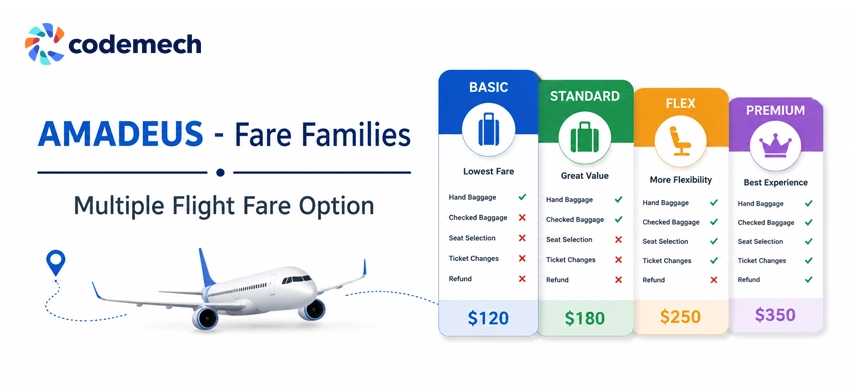
If you have ever compared two flight booking websites, you may have noticed something odd. For the exact same flight, one site shows a single price, while another shows three or four options like Basic, Standard, Flex and Premium. Same airline, same aircraft, same departure time.
This is not a pricing trick, and neither site is wrong. The difference comes down to a single capability in the GDS integration: Fare Families in Amadeus.
Having built and maintained Amadeus API Integrations for corporate and leisure travel platforms over many years, I have seen this one feature confuse product teams, mislead developers into debugging perfectly correct code, and quietly decide how much ancillary revenue a platform earns.
This post explains what fare families are, how they behave in Amadeus, and the practical decisions you face when you implement them.
What fare families actually are
A fare family, sometimes called a branded fare, is an airline's way of selling the same physical seat as several different products.
The seat does not change. What changes is the bundle of conditions and services attached to the ticket: whether a checked bag is included, whether the fare is refundable, whether date changes are free or paid, whether seat selection is included, how many miles you earn, and so on.
Airlines design these ladders deliberately.
The cheapest fare in the family exists to win the price comparison. The middle and upper fares exist to capture the traveller who, once they are already committed to the flight, decides that a checked bag and free changes are worth another forty or sixty dollars.
This is the airline's primary upsell mechanism in the booking flow, and it works remarkably well.
Every airline names its families differently.
One carrier calls them Lite, Value and Flex. Another uses Eco Light, Eco Classic and Eco Flex. A third goes with Basic, Standard, Plus and Premium.
The names are branding, but the underlying structure is the same: an ordered ladder of fares for the same journey, each with a defined set of inclusions.
How Amadeus returns them, and the difference enabling makes
Here is where it becomes an integration topic rather than a marketing topic.
When fare families are enabled on your Amadeus setup, a search request for a given route returns the full ladder of fares for each airline.
For a single flight you receive multiple priced quotes, each carrying its fare family identity and its conditions.
Your platform can then present the traveller with the complete choice: the cheap restrictive fare next to the flexible bundled one.
When fare families are not enabled, the same search returns only the cheapest available fare for that airline and flight.
One flight, one quote, and nothing in the response tells you that three other fare products exist for the same seat.
From the perspective of your parsing code, everything looks correct. The response is valid, the fare is real and bookable. It is simply the bottom rung of a ladder you cannot see.
This leads to the most important practical point in this entire post: fare family availability is not controlled by your code.
It is controlled by your commercial agreement with Amadeus.
In the enterprise world, what you receive in an API response depends on what has been enabled for your account at contract level.
I have watched development teams spend days reviewing their request structure and their response mapping, convinced they had a bug, when the actual fix was an email to Amadeus support and a conversation about the agreement.
The same applies to related content such as baggage indicators and refundability flags.
Before you write a line of integration code, sit down with the agreement and verify that every field your UI needs to display is actually enabled.
This is one of the key considerations during Amadeus GDS Integration projects because supplier configuration and and enabled content directly influence the booking experience.
In GDS work, a surprising number of "bugs" live in the contract, not the codebase.
The data you must extract from each fare
Once fare families are flowing, each quote in the ladder carries the attributes that differentiate it.
In practice, the attributes that matter most to travellers, and therefore must be extracted, normalised and displayed reliably, include:
- Whether checked baggage is included and how much baggage is allowed
- Whether the fare is refundable or non-refundable
- Whether changes are permitted and the applicable change fees
- Whether seat selection is included
- The cabin type or brand name assigned by the airline to the fare family
These fare attributes become essential data points for creating a clear comparison experience inside a Flight Booking Engine.
The baggage distinction deserves special mention.
The difference between a bagged and a bagless fare is frequently the entire reason two fares in the same family differ in price.
If your platform cannot clearly show which fares include a bag, travellers will buy the cheap fare, discover at the airport that baggage costs extra, and blame your platform rather than the airline.
Refundable and non-refundable flags carry the same weight.
These indicators are not decorative details; they are the substance of the fare family concept, and displaying them clearly is the whole point of enabling the feature.
Normalisation is its own quiet challenge.
Because every airline names and structures its families differently, your platform needs a consistent internal model: a fare option with a name, a price, and a standard set of condition flags.
The airline's branding is displayed to the user, but your comparison logic, your sorting and your UI components should run on the normalised model, not on airline-specific naming.
This approach is especially important for scalable Travel Portal Development, where multiple airline suppliers and GDS connections need to work together without creating unnecessary complexity in the application layer.
Displaying fare families: the two layouts that work
Getting the data is half the job.
Presenting four or five fares per flight without overwhelming the traveller is the other half.
Across the platforms I have built and studied, two layout patterns dominate, and each has a clear logic.
The Horizontal Expansion:
In this pattern, the search results list shows one card per flight, priced at the cheapest fare in the family, with a control such as "more fares" or "view fare options" on the card.
When the traveller clicks it, the card expands and the fare families appear side by side as columns: Basic on the left, then Standard, then Flex, each column listing its price and its key inclusions with clear indicators for bags, refundability and changes.
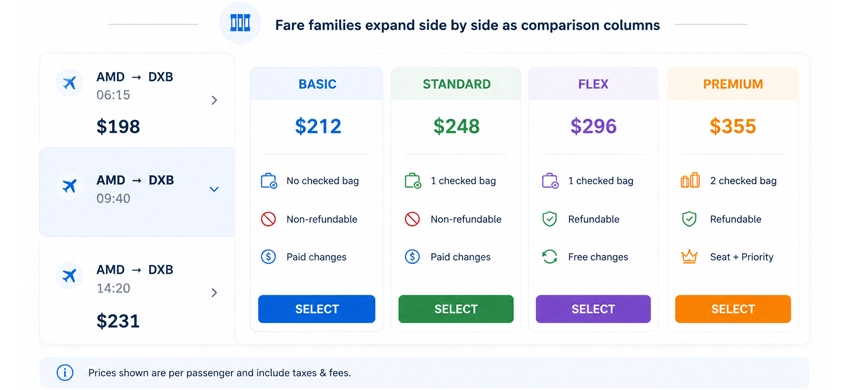
The horizontal layout is strong at comparison.
Because the fares sit next to each other, the traveller's eye moves across a row and immediately sees what an extra thirty dollars buys.
It resembles the pricing tables people already know from software subscriptions, so no learning is required.
Its weakness is horizontal space: on mobile screens, side-by-side columns become cramped, and implementations usually fall back to horizontal scrolling or stacked cards on small viewports.
The Vertical Accordion:
In the second pattern, clicking the flight card expands it in place, accordion style, between the previous and the next search result.
The hidden fares appear as vertically stacked boxes inside the expanded area, each box showing the family name, price and conditions.
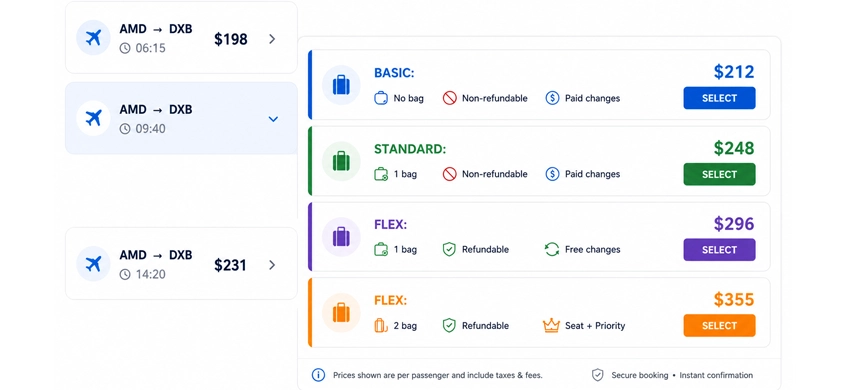
The vertical layout keeps the traveller inside the flow of the results list.
Nothing jumps or reflows dramatically; the list simply opens up at the point of interest and closes again.
It behaves naturally on mobile, where vertical stacking is the native scrolling direction anyway.
Its trade-off is that comparison is slightly harder, since the traveller compares fares by scanning down rather than across, and with four or more options the expanded card can become tall.
Choosing between them
There is no universally correct answer, and user preference genuinely differs between audiences.
Desktop-heavy, comparison-minded audiences, such as corporate travel bookers, tend to do well with the horizontal pattern.
Mobile-first leisure audiences tend to find the vertical accordion more natural.
Whichever pattern you choose, two rules hold in every case.
First, the collapsed card must always show the cheapest fare, because that price is what won the traveller's attention in the results list.
Second, the condition indicators, bag or no bag, refundable or not, must be visible at a glance inside the expansion, using icons or short labels rather than paragraphs of fare rules.
A well-designed Airline Booking System Development approach focuses not only on retrieving fare data but also on presenting it in a way that improves user confidence and booking completion rates.
Why this matters commercially
It is tempting to treat fare families as a display nicety.
They are not.
They are a revenue feature.
A traveller who arrives looking for the cheapest fare and then sees, clearly presented, that the next fare up includes a checked bag and free date changes will upgrade a meaningful percentage of the time.
That uplift goes to the airline, and depending on your commercial model, part of it flows to the platform.
A booking site that shows only the single cheapest quote per airline never gets the chance to earn it.
Many booking issues originate from unclear fare information, incomplete supplier data, or weak validation workflows inside travel systems.
There is also a competitive dimension.
When your platform shows one price and a competitor shows the full ladder for the same flight, your platform looks less capable, even though the flight inventory behind both is identical.
In flight search, richness of information reads as credibility.
For travel technology providers such as Codemech Solutions, implementing features like fare families, branded fares, and advanced GDS connectivity helps travel businesses create more competitive booking experiences.
Practical checklist before you build
Drawing all of this together, here is the sequence I follow on any project that involves fare families in Amadeus.
-
1. Confirm Fare Family Availability
Confirm at agreement level that fare families are enabled for your account, and confirm the same for baggage and refundability content, before writing integration code.
The complexity of supplier integrations, booking workflows, and platform features also plays an important role when planning a travel portal project .
-
2. Validate Fare Conditions
Extract and validate the condition flags on every fare, and treat a fare with missing indicators as an incident to investigate, not something to display blankly.
-
3. Choose the Right Display Layout
Decide your expansion layout, horizontal or vertical, based on your actual audience and device mix, and keep the cheapest fare on the collapsed card.
-
4. Handle Fare Data and Caching Correctly
Finally, remember that fare content interacts with caching: if you cache search results for speed, the full family ladder must be cached and invalidated together, and the selected fare must always be revalidated at booking time before payment.
Final Thoughts
Fare families are one of those GDS features that sit at the intersection of contract, integration, and user experience. Get all three right, and travellers see a clear, transparent choice while your platform benefits from higher customer confidence and better ancillary revenue opportunities. Get any one of them wrong, and you risk confusing users, creating avoidable support issues, or spending valuable development time investigating problems that actually originate from supplier configuration rather than your code.
Whether you are building a new OTA, modernising an airline booking platform, or expanding an existing travel application, understanding how Fare Families in Amadeus work is an important step towards delivering a better booking experience. The technical implementation is only one part of the solution the commercial agreement, data quality, and presentation layer all play equally important roles in creating a successful travel platform.
Need Help with Amadeus API Integration?
If your team is implementing Fare Families in Amadeus, planning an Amadeus API Integration, or building a custom flight booking platform, Codemech Solutions can help you navigate the technical and commercial aspects of the integration. We work with travel businesses to build scalable booking solutions, improve API integrations, and deliver reliable user experiences without compromising performance or maintainability.
If you'd like to discuss your project or explore implementation approaches, feel free to get in touch we're always happy to share practical insights and help you build better travel technology.