

Building with Angular gives you a powerful framework for creating dynamic, scalable applications. But sometimes, even when everything “works,” the app feels sluggish. Pages take longer than expected to load, scrolling isn’t smooth, and typing into inputs can feel laggy. If this sounds familiar, you’re not alone. The truth is, Angular itself isn’t usually the culprit. Instead, performance issues often come from common Angular mistakes small decisions that quietly add up. This guide explores those pitfalls and provides real-world fixes. Whether you’re a developer looking for Angular performance optimization, a client evaluating speed, or a researcher studying modern frameworks, you’ll find practical, actionable insights here. For businesses partnering with an Angular development agency or a frontend development company, these lessons are equally critical to ensure smooth delivery.
Where Things Usually Go Wrong
1. Too Much Work During Change Detection
Angular’s change detection is powerful but can become a bottleneck. By default, Angular checks every component in the tree whenever something changes.
- Mistake: Using the default strategy everywhere.
- Impact: As your app grows, every keystroke, click, or async event triggers a cascade of checks.
- Fix: Switch to
ChangeDetectionStrategy.OnPushfor components that rely on immutable data. This tells Angular to skip unnecessary checks and only re-render when inputs change.
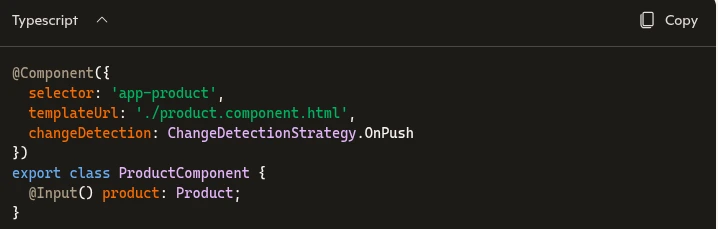
Developer scenario: Imagine a dashboard with 50+ widgets. Without OnPush, every widget re-checks on each keystroke. With OnPush, only the widget receiving new data updates, dramatically improving responsiveness. This is a best practice often emphasized by experienced Typescript development companies delivering enterprise-scale apps.
2. Logic Inside Templates
It’s tempting to write something like:

Looks harmless, but Angular will call that function repeatedly during change detection.
- Fix: Move logic into the component or use a pure pipe.
- Result: Avoids repeated calculations and improves responsiveness instantly.
- Real-world example: A shopping cart recalculating totals on every keystroke can feel laggy. Moving logic into a pipe ensures totals update only when inputs change. Teams offering Typescript development services often highlight this as a quick win to improve Angular speed.
3. Lists Without trackBy
Rendering lists without trackBy forces Angular to re-render the entire list even if only one item changes.

- Fix: Add a
trackByfunction to help Angular identify items uniquely. - Result: Faster list rendering, smoother scrolling. Scenario: A product catalog with thousands of items. Without trackBy, scrolling feels sluggish. With trackBy, Angular only updates changed items. This is a common optimization applied by frontend development services when handling large datasets.
4. Too Many API Calls
Duplicate API calls or nested subscriptions can slow things down quickly.
- Fix: Use RxJS operators like
shareReplay, combineLatest,or caching strategies. - Result: Less load on servers, faster perceived performance for users.
Example: A dashboard fetching user data multiple times. Using
shareReplayensures the data is fetched once and reused across components. This is a hallmark of Angular best practices taught by seasoned frontend web development companies.
5. Everything Loads Upfront
Loading the entire app on the first screen is one of the easiest ways to make it feel slow.
- Fix: Implement lazy loading for feature modules.
- Result: Users only download what they need, reducing initial load time. Scenario: An enterprise app with HR, Finance, and Sales modules. Lazy loading ensures HR staff don’t download Finance code they’ll never use. This technique is widely adopted by Angular development services to fix slow Angular apps.
Practical Angular Performance Optimization Techniques
Critical CSS Inlining
Browsers wait for CSS before rendering. If your stylesheets are large, users see a blank screen longer.
- Fix: Inline critical (above-the-fold) CSS.
- Result: Faster first paint, better user experience.
Resource Hints (preconnect and dns-prefetch)
If your app depends on external domains (APIs, CDNs, fonts), the browser spends time resolving DNS and establishing connections.

- Fix: Add resource hints.
- Result: Reduced latency when resources are requested.
Caching (Browser + API)
Caching is often overlooked but extremely powerful.
- Static assets: Use long cache lifetimes.
- API responses: Cache with
shareReplayor HTTP headers (Cache-Control, ETag). - Result: Repeat visits feel almost instant.
Server-Side Compression
Large JavaScript bundles take time to download.
- Fix: Enable Gzip or Brotli compression on the server.
- Result: Dramatically smaller file sizes, faster downloads.
Optimizing Images
Images are often the heaviest part of any UI.
- Use modern formats like WebP or AVIF.
- Compress before uploading.
- Use
loading="lazy"for offscreen images. Even small changes here can noticeably improve load times.
Reducing Bundle Size
Analyze your bundle with tools like Webpack Bundle Analyzer or Angular CLI’s ng build --stats-json.
- Remove unused libraries.
- Replace heavy dependencies with lighter alternatives.
- Use tree-shaking effectively.
Virtual Scrolling for Large Data
Rendering hundreds of DOM elements at once slows down even powerful devices.
- Fix: Use Angular CDK’s
VirtualScroll. - Result: Only visible items are rendered, keeping the UI smooth.
Advanced Angular Best Practices
Server-Side Rendering (SSR) with Angular Universal
- Improves first paint and SEO.
- Useful for content-heavy apps.
Preloading Strategies
- Use Angular’s
PreloadAllModulesfor frequently accessed modules.
Progressive Web App (PWA) Features
- Service workers for offline caching.
- Background sync for smoother user experience.
State Management
- Use NgRx or Akita for predictable state handling.
- Reduces unnecessary re-renders and improves scalability.
Monitoring and Debugging Angular Performance
Tools You Should Use
- Angular DevTools: Profile change detection cycles.
- Chrome DevTools: Analyze runtime performance.
- Lighthouse: Audit performance, accessibility, SEO.
Metrics to Track
- First Contentful Paint (FCP).
- Time to Interactive (TTI).
- Memory usage.
- API response times.
Case Study: Fixing a Sluggish Angular App
A retail app suffered from slow load times and laggy UI.
- Issues: Large bundle size, inefficient list rendering, memory leaks.
- Fixes: Implemented lazy loading, added
trackBy, unsubscribed properly. - Result: Load time reduced by 40%, UI responsiveness improved significantly.
This is the kind of optimization work we at codemech solutions, a trusted Angular development agency, specialize in helping teams identify bottlenecks and apply Angular best practices to deliver smooth, scalable applications.
Conclusion
Performance issues in Angular apps rarely come from a single mistake. It’s usually a combination of small things extra API calls, unnecessary re-renders, large assets that quietly add up. If you’re not sure where to start, focus on these first:
- Avoid logic in templates.
- Use
trackByin lists. - Switch to
OnPushwhere possible.
Then layer in optimizations like caching, compression, and resource hints.
You don’t need to do everything at once. Even a few of these changes can make your app feel noticeably faster. And once you start paying attention to these patterns, performance stops being a problem you fix later and becomes something you build in from the start.
At codemech solutions, we believe Angular performance optimization is not just about speed it’s about creating experiences that users love and trust. Whether you’re seeking Typescript development services or full-scale frontend development services , the right approach ensures your app performs at its best.