Introduction
For many enterprises, a legacy application is much more than an old piece of software.
It may process customer transactions, manage financial records, support insurance claims, operate internal workflows, connect business systems, or store years of critical operational data. In many cases, the application has become deeply connected to the way the organization works.
That creates a difficult modernization problem.
The business knows the legacy system needs to change, but the business cannot simply turn it off.
A traditional replacement approach often means building a new platform, moving the data, switching users to the new environment, and hoping everything works after the cutover. For a business-critical application, that creates significant operational risk.
A better approach is to modernize incrementally.
Legacy system modernization allows organizations to gradually replace outdated application components while keeping the existing system operational. Instead of treating modernization as one large migration event, the organization breaks the system into manageable capabilities, builds modern components alongside the legacy application, validates them under realistic conditions, and gradually moves production traffic.
This guide explains how organizations can approach zero-downtime legacy application modernization, including architecture patterns, data migration strategies, testing, observability, rollback planning, and the governance decisions CIOs and technology leaders need to make.
What Is Legacy System Modernization?
Legacy system modernization is the process of improving, restructuring, migrating, or replacing an existing business application while preserving the business capabilities and data the organization depends on.
Modernization can involve several layers of a technology environment:
- Application code
- System architecture
- Databases
- APIs and integrations
- Infrastructure
- Cloud platforms
- Security controls
- Deployment processes
- Monitoring and observability
- User interfaces
- Business workflows
Modernization does not always mean completely replacing the application.
Depending on the system's condition and business requirements, an organization may choose to:
- Refactor existing code
- Replatform the application
- Rebuild selected components
- Extract services from a monolith
- Modernize the database
- Introduce APIs around legacy functionality
- Move workloads to the cloud
- Replace selected modules
- Gradually retire the entire legacy platform
The right approach depends on the application's architecture, business criticality, technical debt, data dependencies, integration landscape, security requirements, and modernization objectives.
Why Big-Bang Legacy Migration Is Risky
A common modernization strategy is to build the new platform separately and perform a single cutover when everything is considered ready.
It sounds straightforward:
Build → Test → Freeze → Migrate → Switch → Go Live
The problem is that production systems rarely behave as predictably as development and staging environments.
A big-bang migration can create several risks.
1. Data Drift
The legacy system may continue receiving transactions while the new platform is being prepared.
Even a short freeze window can create data inconsistencies, reconciliation work, and unexpected production issues.
2. Hidden Business Logic
Older systems often contain business rules that were never properly documented.
Some may exist inside:
- Database procedures
- Legacy code
- Integration scripts
- Manual processes
- Scheduled tasks
- Exception handling
A new system can technically reproduce the documented requirements while still missing important real-world behavior.
3. Production Scale
A staging environment rarely reproduces every characteristic of production.
Production may contain:
- Larger datasets
- Unexpected traffic patterns
- Data anomalies
- High concurrency
- Rare transaction combinations
- Long-running processes
- External integration failures
4. Difficult Rollback
If the new platform fails after cutover, returning to the legacy platform may not be simple.
Data may already have changed.
Transactions may have been processed differently.
The two environments may no longer be synchronized.
5. Concentrated Operational Risk
A big-bang migration places enormous pressure on one event.
Multiple teams may be working simultaneously across:
- Infrastructure
- Application development
- Database engineering
- QA
- Security
- DevOps
- Business operations
This increases the possibility of human error.
For these reasons, modernization should generally be treated as an incremental and reversible transformation, rather than one high-risk event.
What Is a Zero-Downtime Migration?
A zero-downtime migration is a modernization approach designed to keep the business application available while workloads, functionality, and data gradually transition to the modernized environment.
The goal is not simply:
"Move the application without turning it off."
The larger objective is:
Introduce the new architecture while maintaining business continuity, data consistency, observability, and a reliable rollback path.
A successful migration therefore needs more than application development.
It requires coordination between:
Architecture + Application + Data + Infrastructure + DevOps + Testing + Observability + Governance
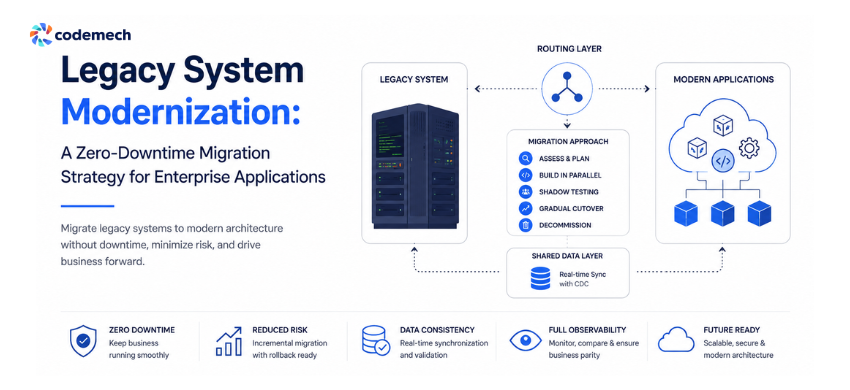
The Strangler Fig Pattern for Legacy Modernization
One of the most useful architectural approaches for incremental legacy modernization is the Strangler Fig pattern.
Instead of replacing the entire legacy system at once, new capabilities are introduced around it.
A routing or API layer sits between clients and the underlying systems.
As individual capabilities are modernized, traffic for those capabilities is redirected to the new services.
Everything that has not yet been migrated continues to use the legacy system.
Conceptually:
Users / Client Applications
↓
Routing / API Facade
↙ ↘
Modern Services Legacy System
↓
Shared / Synchronized Data
This creates an important advantage:
The organization can modernize one business capability at a time.
For example, an enterprise application might contain:
- Customer management
- Pricing
- Orders
- Payments
- Reporting
- Notifications
- Document processing
Instead of rebuilding everything simultaneously, the organization could modernize one capability, validate it, gradually move traffic to it, and then proceed to the next.
The routing layer should support:
- Fine-grained traffic routing
- Feature flags
- Customer or geography-based routing
- Canary releases
- Fast rollback
- Monitoring of both systems
- Request and response comparison
The 5-Phase Zero-Downtime Modernization Strategy
A practical legacy application modernization program can be organized into five repeating phases.
Phase 1: Assess and Slice the Legacy System
Do not begin by asking:
"How do we rebuild the entire application?"
Start by asking:
"Which business capability can we safely modernize first?"
The first step is to understand the existing system.
Assess:
- Application architecture
- Source code
- Database dependencies
- APIs
- Third-party integrations
- Business workflows
- Infrastructure
- Security requirements
- Performance characteristics
- Data ownership
- Technical debt
- Operational dependencies
Then divide the system into functional slices.
A functional slice could be something such as:
- Customer lookup
- Pricing calculation
- Invoice generation
- Employee management
- Order processing
- Notification management
The best migration slice usually has both:
A clear business boundary
and
A realistic technical boundary.
A useful question to ask is:
If this component were modernized independently, could the organization test and operate it without changing the entire system?
If the answer is yes, it may be a strong candidate for the first migration slice.
Phase 2: Build the Modern Component in Parallel
Once a migration slice has been selected, build the modernized component alongside the legacy system.
At this stage:
The new service exists, but production users are still using the legacy path.
This provides an important safety layer.
The team can validate:
- Application behavior
- Infrastructure
- APIs
- Security
- Performance
- Deployment
- Logging
- Monitoring
- Data synchronization
without immediately exposing customers to the new implementation.
Data synchronization should also be established during this stage so the new service has access to current information.
Change Data Capture (CDC) can be useful because changes from the legacy database can be captured and propagated to the modern data store without requiring major changes to the existing application's write path.
Phase 3: Use Shadow Traffic Before Real Cutover
This is one of the most valuable stages of a zero-downtime modernization strategy.
Instead of immediately sending customers to the new application, production requests can be mirrored to the new service.
The customer continues receiving the legacy response.
The modernized service processes the same request in the background.
The team then compares the results.
For example:
Production Request
↓
Legacy System → Customer Response
and simultaneously:
Production Request
↓
Modern Service → Comparison Result
Discrepancies can then be investigated before the new system becomes customer-facing.
This is particularly valuable for discovering undocumented business logic and edge cases.
What Should Be Compared?
Depending on the application, teams can compare:
- Response values
- Business calculations
- Status codes
- Validation behavior
- Processing time
- Error conditions
- Database results
- Generated documents
- Downstream events
The goal is not necessarily to achieve identical technical implementation.
The goal is to establish business behavior parity.
Phase 4: Gradually Shift Production Traffic
Once shadow testing demonstrates acceptable parity, production traffic can begin moving to the new service.
Avoid switching everything at once.
A controlled sequence might look like:
1% → 5% → 10% → 25% → 50% → 75% → 100%
The exact percentages depend on the application and risk profile.
At every stage, monitor the system.
Important signals include:
- Error rate
- Response latency
- Throughput
- Infrastructure health
- Database performance
- Business transaction success
- Customer behavior
- Integration failures
If the modern service begins behaving unexpectedly, traffic can be routed back to the legacy implementation.
Feature flags and routing controls make this possible.
The Key Principle
Never increase traffic simply because the deployment is technically successful.
Increase traffic because the evidence shows the system is behaving correctly.
Phase 5: Decommission the Legacy Component
A modernization project is not complete simply because the new service reaches 100% traffic.
The old implementation must eventually be retired.
Before decommissioning, confirm:
- No production traffic remains
- Required data has been migrated
- Integrations have been updated
- Monitoring is stable
- Rollback requirements have been addressed
- Security dependencies are removed
- Backups and retention requirements are satisfied
- Operational documentation is updated
Only then should the legacy component be retired.
This matters because leaving old code running indefinitely creates another form of technical debt.
How to Migrate Legacy Data Without Downtime
Application modernization is only half of the problem.
Data is often the harder part.
The application can be replaced, but the business still needs accurate, current and consistent data.
Several strategies can be considered.
1. Dual Writes
The application writes changes to both:
- Legacy database
- Modern database
This approach can work, but it introduces consistency risks.
What happens if:
Legacy write succeeds
but
Modern write fails?
A reconciliation mechanism is therefore essential.
2. Change Data Capture
With CDC, database changes are captured from the existing system and propagated to the modern environment.
This allows the modern system to stay synchronized while the legacy application continues operating.
CDC can be particularly useful when modifying the legacy application's existing write logic would introduce unnecessary risk.
3. Event-Based Migration
Organizations moving toward event-driven architectures can introduce a bridge that translates legacy changes into domain events.
This can help gradually transition the architecture toward modern event-driven services rather than attempting an immediate transformation.
4. Continuous Reconciliation
Regardless of the selected strategy, reconciliation should not happen only during final cutover.
Automated reconciliation can continuously compare:
- Record counts
- Key fields
- Transaction states
- Account balances
- Status values
- Timestamps
- Business outcomes
The earlier a discrepancy is detected, the easier it generally is to investigate.
Legacy Modernization and Cloud Migration
Cloud migration and legacy modernization are related, but they are not the same thing.
Moving an old application to the cloud does not automatically modernize its architecture.
For example:
Legacy application + cloud infrastructure = migrated legacy application
Whereas:
Modernized architecture + cloud-native infrastructure = application modernization
Depending on the organization's objectives, modernization may include:
- Containerization
- Managed databases
- API-driven architecture
- Microservices
- Automated CI/CD
- Infrastructure as Code
- Centralized observability
- Auto-scaling
- Modern identity and access controls
The correct choice depends on the application's requirements.
Not every legacy application needs to become a collection of microservices.
Should You Convert a Legacy Monolith to Microservices?
This is one of the most common questions in modernization projects.
The answer is:
Not necessarily.
Microservices can provide benefits such as independent deployment and service-level scaling, but they also introduce additional operational complexity.
Before decomposing a monolith, evaluate:
- Business boundaries
- Team structure
- Deployment requirements
- Scaling requirements
- Data ownership
- Integration complexity
- Operational maturity
- Monitoring capabilities
A poorly planned microservices migration can simply transform one difficult system into many difficult systems.
The objective should not be:
"We need microservices."
The objective should be:
"We need an architecture that solves the business and technical problems the legacy architecture currently creates."
Observability: The Safety Net of Zero-Downtime Migration
A gradual migration is only safe when the organization can see what is happening.
Monitoring should cover both:
Legacy system
and
Modern system
at the same time.
Useful measurements include:
Technical Metrics
- CPU and memory
- Database performance
- API latency
- Error rates
- Request volume
- Infrastructure health
Application Metrics
- Failed transactions
- Processing time
- Queue depth
- Service availability
- Integration failures
Business Metrics
- Successful orders
- Completed payments
- Customer actions
- Revenue-related transactions
- Failed business workflows
Technical metrics tell you that a system is running.
Business metrics tell you whether the system is actually working.
This distinction is critical during modernization.
Designing a Reliable Rollback Strategy
Every migration phase should have a clearly defined rollback condition.
Before increasing traffic, establish:
- What metrics trigger rollback?
- Who has authority to initiate it?
- How quickly can traffic be redirected?
- What happens to data written by the modern service?
- How will transactions be reconciled?
- How will customers be protected?
Rollback should not depend on a long approval chain during an incident.
A clear migration governance model should identify a person or team with explicit authority to initiate rollback when predefined thresholds are breached.
Common Legacy Modernization Mistakes
Modernizing Everything at Once
Large modernization programs become difficult to control when every component is changed simultaneously.
Better approach: Start with well-defined migration slices.
Ignoring Undocumented Business Logic
Documentation does not always represent everything the production system actually does.
Better approach: Use shadow traffic and production behavior analysis.
Treating Data Migration as a Final Step
Data synchronization should begin early.
Better approach: Design the data migration strategy alongside application modernization.
Measuring Only Technical Success
A service can have excellent uptime and still produce incorrect business results.
Better approach: Measure business outcomes as well as infrastructure metrics.
Skipping Decommissioning
Leaving legacy components running forever increases cost and complexity.
Better approach: Make legacy retirement part of the original modernization roadmap.
Treating Microservices as the Goal
Microservices are an architectural option, not a modernization objective.
Better approach: Select architecture based on business and technical requirements.
A Practical Legacy Modernization Decision Framework
Before choosing a modernization strategy, evaluate the existing application against five dimensions.
| Area | Questions to Ask |
|---|---|
| Business | How critical is the application to daily operations? |
| Architecture | Which components are tightly coupled? |
| Data | Where does critical business data live? |
| Integration | Which external and internal systems depend on it? |
| Operations | Can the organization monitor, deploy and roll back safely? |
Then determine whether each component should be:
Retained → Refactored → Replatformed → Rebuilt → Replaced → Retired
This avoids forcing the entire application into one modernization strategy.
Legacy System Modernization Checklist
Before Starting
- Document the existing architecture
- Identify critical business workflows
- Map application dependencies
- Identify data owners
- Map external integrations
- Identify technical debt
- Select the first modernization slice
- Define success metrics
- Establish data synchronization
- Build observability
- Define rollback criteria
- Establish migration ownership
During Migration
- Build the modern component in parallel
- Synchronize required data
- Run shadow traffic
- Compare business behavior
- Start with controlled traffic
- Monitor technical and business metrics
- Test rollback
- Increase traffic gradually
- Document migration results
After Migration
- Confirm 100% production traffic
- Monitor stability
- Complete reconciliation
- Remove obsolete integrations
- Retire legacy code
- Update documentation
- Review lessons learned
- Apply improvements to the next migration slice
How Long Does Legacy System Modernization Take?
There is no universal timeline.
A small application with limited dependencies may be modernized relatively quickly, while a business-critical enterprise platform can require a much longer transformation program.
The timeline depends on:
- Application size
- Technical debt
- Number of integrations
- Data complexity
- Business criticality
- Compliance requirements
- Team capacity
- Target architecture
- Testing requirements
- Migration strategy
For large enterprise systems, modernization can become a multi-phase program rather than a short development project.
When Should You Modernize a Legacy System?
Modernization becomes particularly important when an existing application is creating measurable business or technology constraints.
Common warning signs include:
- Increasing maintenance costs
- Difficulty hiring engineers with relevant skills
- Slow release cycles
- Frequent production incidents
- Security limitations
- Poor scalability
- Outdated infrastructure
- Difficult integrations
- Poor user experience
- Inability to support new business requirements
- High technical debt
- Vendor or platform dependency
However, age alone is not a reason to replace a system.
A stable legacy application that continues to meet business requirements may not need immediate modernization.
The better question is:
Is the legacy architecture preventing the business from achieving its current and future goals?
Modernize or Replace: Which Approach Is Right?
There is no single answer for every organization.
Modernize When
- The existing business logic remains valuable
- The system contains complex institutional knowledge
- The application can be decomposed into manageable capabilities
- Business continuity is critical
- Incremental migration is practical
Replace When
- The existing architecture is fundamentally unsuitable
- Business requirements have changed dramatically
- The application has limited reusable logic
- Maintaining the old platform costs more than rebuilding it
- A clean architecture provides substantially greater long-term value
Hybrid Modernization
Many enterprises ultimately use a combination of:
Refactor + Replatform + Rebuild + Replace
depending on the individual application component.
Final Takeaway for CIOs and Technology Leaders
Legacy modernization is not simply a technology replacement exercise.
It is a controlled business transformation.
The safest approach is usually not to ask:
"How quickly can we turn off the old system?"
Instead, ask:
"How can we progressively reduce our dependency on the old system while maintaining business continuity?"
A zero-downtime modernization strategy provides a framework for doing exactly that.
Start by understanding the existing environment.
Break the system into realistic business capabilities.
Build modern components alongside the legacy application.
Synchronize data.
Use shadow traffic to discover hidden behavior.
Gradually shift production traffic.
Monitor both technical and business outcomes.
Keep rollback available.
Then, once the modern capability has demonstrated sustained stability, retire the corresponding legacy component.
The result is not simply a newer technology stack.
It is a more maintainable, observable, scalable and adaptable technology foundation for the business.
Modernization succeeds when the organization can move forward without putting the business at unnecessary risk.
How Codemech Solutions Can Help With Legacy Application Modernization
Modernizing a business-critical application requires more than rewriting code.
It requires a clear understanding of the existing system, its business logic, data, integrations and operational requirements.
Codemech Solutions can support organizations across the broader software modernization lifecycle, including:
- Legacy application assessment
- Custom software development
- Enterprise application modernization
- API and system integration
- Cloud application development
- Database modernization
- Microservices architecture
- DevOps and CI/CD implementation
- Application migration
- Scalable software architecture
- Ongoing software engineering and modernization
If your legacy application is becoming difficult to maintain, integrate, scale or evolve, the first step does not necessarily need to be a complete replacement.
Start with an assessment of what should change, what should remain, and what can be modernized incrementally.